

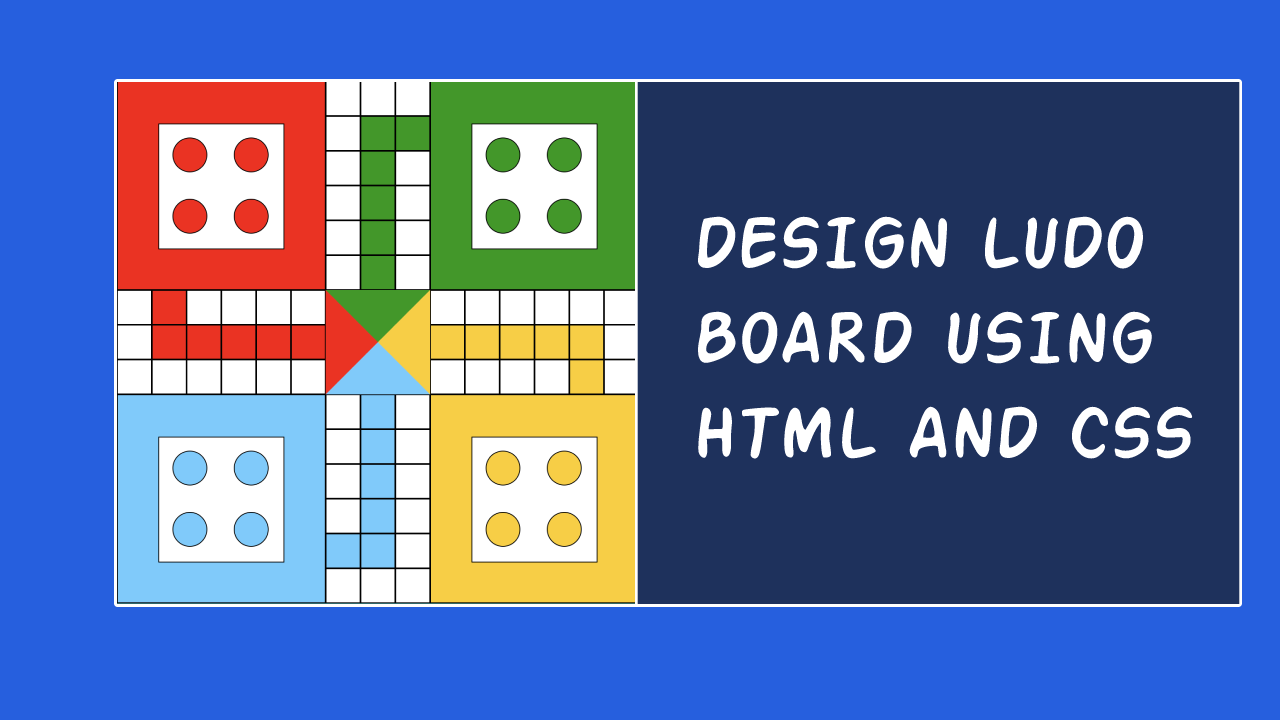

The Ludo board is a square-shaped board with a cross-shaped pattern in the center, dividing it into four quadrants. Each quadrant has a starting area, a home area, and a path connecting them. T
here are four colored areas, with each color representing a player. The starting areas have four colored circles, where the player’s four tokens are initially placed. The home areas have four squares of the same color, where the tokens need to reach to win the game.
The path is divided into colored squares, and players move their tokens by rolling a dice and moving their tokens according to the number on the dice. The game is won by the player who first moves all of their tokens from the starting area to the home area.
Follow this video for complete guidance :
Complete Source Code :
<style type="text/css">
  .green{
    background-color: #009900;
  }
  .red{
    background-color: #FF0000;
  }
  .blue{
    background-color: #66CCFF;
  }
  .yellow{
    background-color: #FFCC00;
  }
  .row{
    display: flex;
  }
  .board{
    width: fit-content;
    border: 10px solid #11262e;
    border-radius: 5px;
    margin: 10px auto;
  }
  .white-box{
    background-color: white;
      width: 150px;
      height: 150px;
      margin: 20% auto;
      border: 1px solid black;
  }
  .red-box{
    background-color: #FF0000;
      width: 250px;
      height: 250px;
      border: 1px solid black;
  }
  .green-box{
      background-color: #009900;
      width: 250px;
      height: 250px;
      border: 1px solid black;
  }
  .blue-box{
    background-color: #66CCFF;
      width: 250px;
      height: 250px;
      border:1px solid black;
  }
  .yellow-box{
    background-color: #FFCC00;
      width: 250px;
      height: 250px;
      border:1px solid #000;
  }
  .white-box .circle{
    border-radius: 50%;
      width: 40px;
      height: 40px;
      float: left;
      margin: 16px;
      border: 1px solid black;
  }
  .cell{
      width: 40px;
      height: 40px;
      border: 1px solid #000;
  }
  .destination{
    border-top: 63px solid #009900;
      border-left: 63px solid #FF0000;
      border-right: 63px solid #FFCC00;
      border-bottom: 63px solid #66CCFF;
  }

</style>
<div class="board">
  <div class="row">
    <div class="red-box">
      <div class="white-box">
        <div class="red circle"></div>
        <div class="red circle"></div>
        <div class="red circle"></div>
        <div class="red circle"></div>
      </div>
    </div>
    <div class="cell-container">
      <div class="row">
        <div class="cell"></div>
        <div class="cell"></div>
        <div class="cell"></div>
      </div>
      <div class="row">
        <div class="cell"></div>
        <div class="cell green"></div>
        <div class="cell green"></div>
      </div>
      <div class="row">
        <div class="cell"></div>
        <div class="cell green"></div>
        <div class="cell"></div>
      </div>
      <div class="row">
        <div class="cell"></div>
        <div class="cell green"></div>
        <div class="cell"></div>
      </div>
      <div class="row">
        <div class="cell"></div>
        <div class="cell green"></div>
        <div class="cell"></div>
      </div>
      <div class="row">
        <div class="cell"></div>
        <div class="cell green"></div>
        <div class="cell"></div>
      </div>
    </div>
    <div class="green-box">
      <div class="white-box">
        <div class="green circle"></div>
        <div class="green circle"></div>
        <div class="green circle"></div>
        <div class="green circle"></div>
      </div>
    </div>
  </div>
  <div class="row">
    <div class="cell-container">
      <div class="row">
        <div class="cell"></div>
        <div class="cell red"></div>
        <div class="cell"></div>
        <div class="cell"></div>
        <div class="cell"></div>
        <div class="cell"></div>
      </div>
      <div class="row">
        <div class="cell"></div>
        <div class="cell red"></div>
        <div class="cell red"></div>
        <div class="cell red"></div>
        <div class="cell red"></div>
        <div class="cell red"></div>
      </div>
      <div class="row">
        <div class="cell"></div>
        <div class="cell"></div>
        <div class="cell"></div>
        <div class="cell"></div>
        <div class="cell"></div>
        <div class="cell"></div>
      </div>
    </div>
    <div class="destination"></div>
    <div class="cell-container">
      <div class="row">
        <div class="cell"></div>
        <div class="cell"></div>
        <div class="cell"></div>
        <div class="cell"></div>
        <div class="cell"></div>
        <div class="cell"></div>
      </div>
      <div class="row">
        <div class="cell yellow"></div>
        <div class="cell yellow"></div>
        <div class="cell yellow"></div>
        <div class="cell yellow"></div>
        <div class="cell yellow"></div>
        <div class="cell"></div>
      </div>
      <div class="row">
        <div class="cell"></div>
        <div class="cell"></div>
        <div class="cell"></div>
        <div class="cell"></div>
        <div class="cell yellow"></div>
        <div class="cell"></div>
      </div>
    </div>
  </div>
  <div class="row">
    <div class="blue-box">
      <div class="white-box">
        <div class="blue circle"></div>
        <div class="blue circle"></div>
        <div class="blue circle"></div>
        <div class="blue circle"></div>
      </div>
    </div>
    <div class="cell-container">
      <div class="row">
        <div class="cell"></div>
        <div class="cell blue"></div>
        <div class="cell"></div>
      </div>
      <div class="row">
        <div class="cell"></div>
        <div class="cell blue"></div>
        <div class="cell "></div>
      </div>
      <div class="row">
        <div class="cell"></div>
        <div class="cell blue"></div>
        <div class="cell"></div>
      </div>
      <div class="row">
        <div class="cell"></div>
        <div class="cell blue"></div>
        <div class="cell"></div>
      </div>
      <div class="row">
        <div class="cell blue"></div>
        <div class="cell blue"></div>
        <div class="cell"></div>
      </div>
      <div class="row">
        <div class="cell"></div>
        <div class="cell"></div>
        <div class="cell"></div>
      </div>
    </div>
    <div class="yellow-box">
      <div class="white-box">
        <div class="yellow circle"></div>
        <div class="yellow circle"></div>
        <div class="yellow circle"></div>
        <div class="yellow circle"></div>
      </div>
    </div>
  </div>
</div>


